
Expert Budget Tips & Advice
Simple tips to help you master your personal finances.
Get Help Making a Personal Budget
Financial Tips and Guidelines
We’re committed to helping you learn good money management skills. Below, our highly requested 7 step workbook – which helps tens of thousands of people every year develop a personal budget – can help you too by guiding you through the process of organizing your money, understanding where you are, and making concrete plans to reach your financial goals.
We’ve also created additional ways to receive budgeting tips and guidance with our Budget Calculator app and spreadsheet. Each one shows you what a normal amount is to spend in each budgeting category and provides you with tips and suggestions as you build your budget.
3 Ways to Build Your Budget
All three are free and were created by our non-profit credit counsellors. There is no right or wrong way to budget. The only real question is how you like to work. Pick the one that fits you best, or mix and match.

Budget Calculator App
Build your budget right in your browser, on any device. There is nothing to download.
Best for: getting started right away with step by step guidance.
What you get
- Friendly coaching as you go
- Canadian spending guidelines to compare your numbers with
- A snapshot of your financial health
- The option to import from My Spending Tracker
- Private autosave on your device, with no account or bank access needed

Budget Calculator Spreadsheet
A reusable budget worksheet you can keep on your computer and use offline.
Best for: spreadsheet fans. It works in Google Sheets too.
What you get
- The same Canadian spending guidelines as the app
- Dropdowns for how often you pay each expense
- Graphs that show where your money goes
- Suggestions for cutting costs
Other versions
7 Steps Budgeting Workbook
Learn to budget one short step at a time with our new online workbook.
Best for: learning how to budget from the ground up.
What you get
- No sign up needed
- A short lesson with each step that you can read or listen to
- Quick activities that save as you go
- My Money Plan, a one page budget plan built from your answers that you can print or save
- Progress tracking and badges to keep you going
- Privacy, since your answers stay on your device
Prefer pen and paper?
You do not have to choose. They work together. Start in the app and export your budget to the Excel spreadsheet anytime, or import a filled spreadsheet into the app to keep going online. Many people also learn the process with the workbook first, then move to the app or spreadsheet to keep their budget up to date.

Budget Calculator That Guides You & Helps You Build a Budget
To make budgeting easier and more fun, we’ve created a budget calculator that guides you as you create your own budget. It makes suggestions and warns you if you’re spending too much money in any part of your budget.
Once you’re done, it can take a look at your budget and see if it can find any ways for you to improve your spending plan or save some money.
Features of Our Free Budget Calculator Spreadsheet
Our free Excel, OpenOffice, and Numbers (for the Mac) budgeting worksheet will help you manage your money better. The features of the calculator include:
- A smart, interactive calculator worksheet that guides you through the budgeting process.
- User friendly and easy to use even if you don’t really know how to use Excel. We even have versions that work outside of Excel.
- Gives you a whole new perspective on your budget with simple, helpful graphs (this is great if you’re not a numbers person).
- Tells you what a “normal” amount is to spend in each category of your budget based on our budgeting guidelines.
- Clear graphs, dollar values and percentages so that you can adjust your budget as you go.
- Does all the math for you.
- Stand-alone Excel, Open Office, or Mac Numbers file keeps your information private on your own computer.
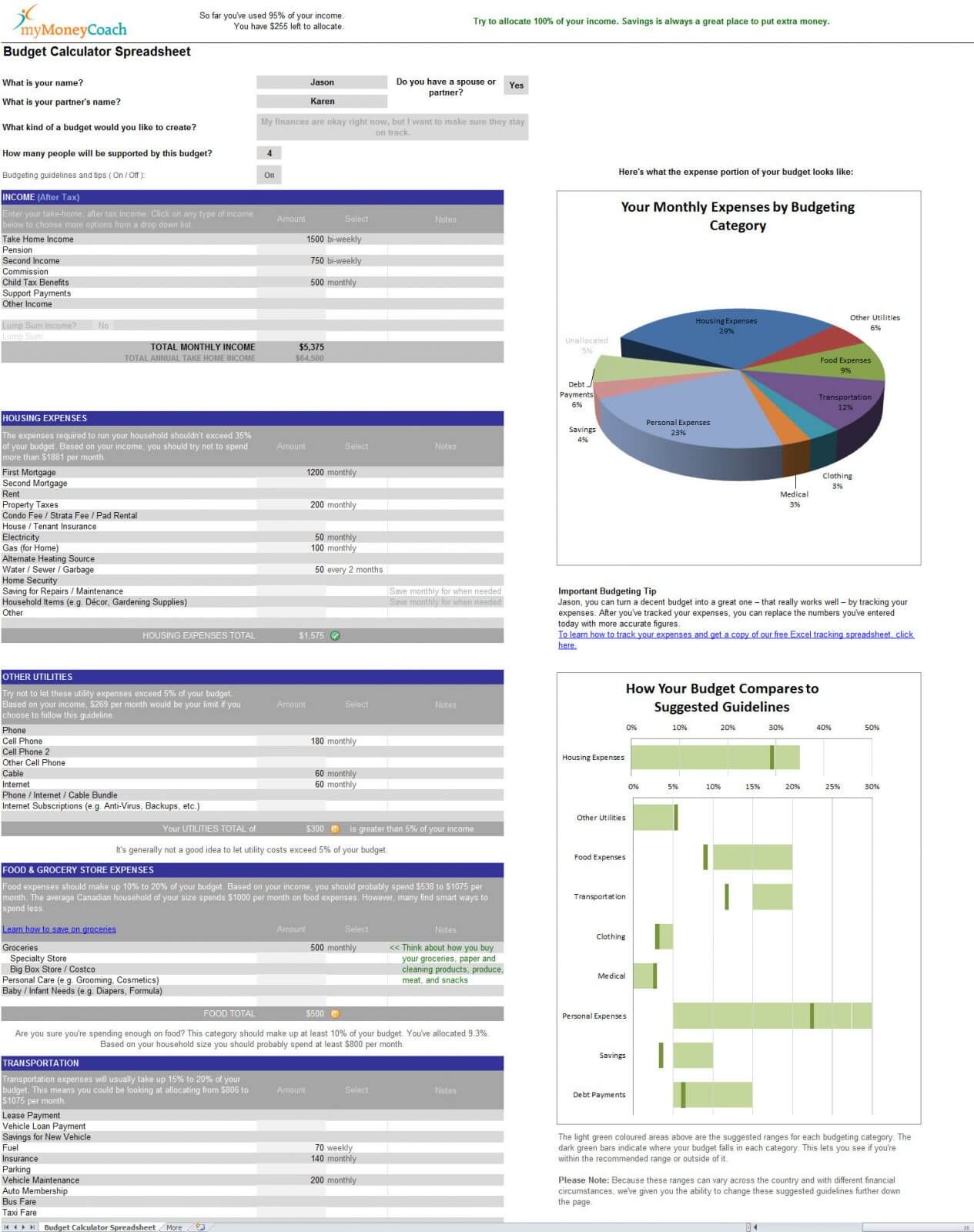
- Drop down menus let you tell it whether each expense occurs weekly, monthly, annually, etc.
- Keeps a running total of how much you’re planning to spend versus your income.
- Finds common budgeting pitfalls and offers tips and solutions to fix them.
- If you want to reduce your expenses and save some money, it can suggest dozens of places where you could look at reducing your expenses.
- Easy to use with more personalized expense categories than other similar budgeting templates.
The budget calculator is also a personal budget template that can be used just as easily for household or family budgets. For more details, check out the budget calculator home page on our educational website, MyMoneyCoach.ca.
Download the Budget Calculator for Excel, OpenOffice, or Numbers (Mac) . . . and even Google Sheets
Below you can download the free budget calculator spreadsheet for the PC or Mac on Excel, OpenOffice, or Numbers (Mac only). The first two options (Microsoft Excel Spreadsheet English & French) also work in Google Sheets to a fair degree (all of the base functionality and tips work. It’s only the charts and some extra bells and whistles that don’t fully work).
Budget Calculator App for All Devices
Microsoft Excel Spreadsheet (English)
Microsoft Excel Spreadsheet (French)
For Macs, iPhones & iPads with the Numbers app
OpenOffice
(English)
You can download OpenOffice for free
Budgeting and Money Management Tips
Impulse Shopping, Groceries, Kids & More
Low Income – No Income . . . Now What?
How Much Money You Should Spend on Living Expenses – Budgeting Guidelines for Income
Grocery Shopping Tips that will Save you Money
Impulse Spending: A Matter of Interest
Clothing and Credit: A Matter of Interest
Is your debt causing budgeting problems?
See how we can help you. Just answer 4 simple questions
If you can take a minute to answer these 4 multiple-choice questions, you can find out you how we may be able to help you. What you learn may surprise you.
Related Topics

Getting Rid of Debt
We’re happy to help you figure out your options. There are more than you might think.
Financial Calculators
A picture can tell a thousand words. Manage money better when you see how you stack up.
Track Your Spending
An essential part of building a budget is tracking how much you actually spend. Here’s how.

Was this page helpful?

Thanks for letting us know.

